

How It Works: Starting Tuition with Quill
Our onboarding process is designed to be swift and hassle-free. We prioritise email communication for clarity and efficacy, and can have your child matched with a tutor within 24 hours.
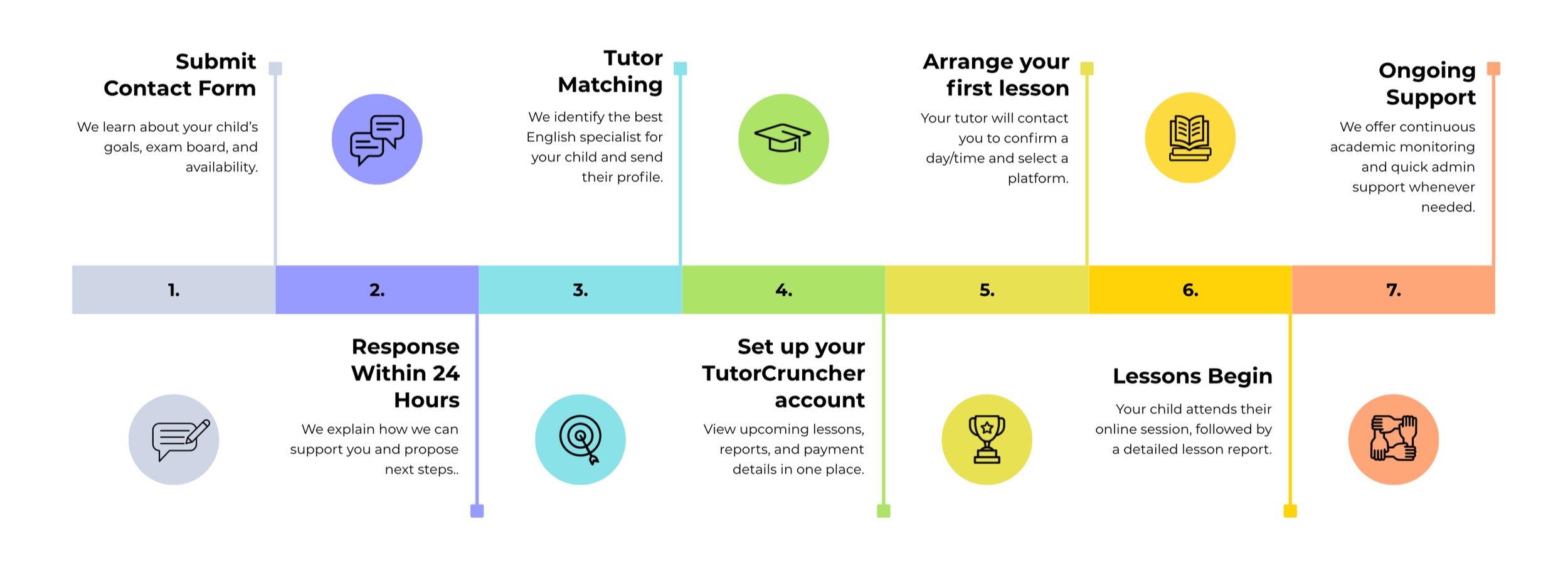
1. Submit the Contact Form
You fill out a detailed enquiry form that includes the student’s year group, exam board, learning goals, availability, and any SEND or additional information.
This allows us to understand the student’s needs clearly from the very beginning.


2. Receive a Response Within 24 Hours
We send a personalised email within 24 hours confirming that we’ve received the enquiry.
This email outlines how we can accommodate the student, the likely timeline for arranging a tutor, and any follow-up questions we may need before matching them.
3. Tutor Matching and Confirmation
Once we have all required details, we select the most suitable tutor based on:
subject level (KS3 / GCSE / A-Level)
exam board
availability
teaching style
experience
We then email you with a proposed tutor match and a short profile.
Simply confirm that you are happy to proceed.
4. Parent Account Created in TutorCruncher
After confirmation, we create your account in TutorCruncher.
What happens here:
You receive an invite link to set a password
Here you can view your tutor match, scheduled lessons, and invoices
Lesson reports will appear here after each session
This step replaces long email chains and keeps everything organised in one place.
5. Payment Setup
Add a card to your account and credit is automatically added before your lessons.
6. Tutor Contacts Parent to Arrange First Lesson
Once payment details are set up, the tutor will contact you through TutorCruncher or email—your choice) to:
confirm availability
agree on a day and time
choose the teaching platform (Zoom, Google Meet, Lessonspace, etc.)
7. First Lesson Takes Place
The student attends the scheduled online lesson.
You receive:
a lesson reminder
after the session, a lesson report written by the tutor
The lesson report includes what was covered, strengths, and suggested next steps.
8. Ongoing Lessons
Lessons continue weekly at the agreed time.
Parents can view:
upcoming lessons
past lessons
reports
invoices
inside TutorCruncher at any time.
If the parent ever needs to change the lesson schedule, they can ask the tutor directly.
9. Continued Support from Quill Education
We check in with parents to ensure everything is running smoothly and to gather feedback.
If they ever need:
a change in tutor
additional support
exam-focused revision plans
We arrange this quickly through our admin team.